Skirmish Dice: WWII › How each tab works › Bag
Tab 2 of 6 · Skirmish Dice: WWII
The Bag tab
What this tab is for
The Bag tab is a bag of order dice on your phone. You draw one at random to see which player acts next.
Tap a heading below to open or close it. The page remembers which ones you left open.
When you'd use this tab
Use the Bag tab when:
- It is the start of a turn and every player puts their dice in the bag.
- You need to know who goes next. You draw one die to find out.
- A unit is wiped out, so its die must come out of the bag.
- Everyone has acted, and it is time for the next turn.
Why use the app for this
Doing it by hand works, but the app makes it easier:
- No cloth bag to find, and no dice rolling off the table.
- The draw is truly random. Nobody can feel for their color.
- The app shows how many dice are left for each player.
- Undo puts a die back if someone drew by mistake.
- You can see every die drawn this turn, in order.
How to use it, step by step
Try it: you and a friend each have 6 dice in the bag. It is turn 1.
- Open the Bag tab. The big die says “Draw a die”.
- Tap DRAW. The die tumbles and shows a player name, like “Player 2”. That player acts now.
- Under “Give Player 2 an order”, tap what the unit will do, like Fire.
- Keep tapping DRAW until the bag is empty. The button changes to BAG EMPTY.
- Tap Next turn. The bag fills back up and the turn number goes up by 1.
Where things are on the screen
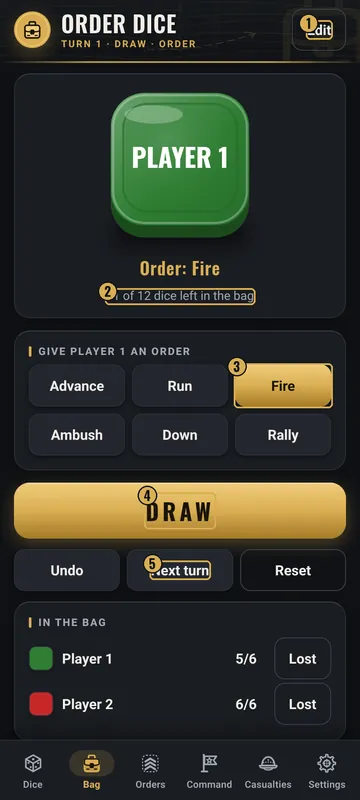
The numbers on the pictures match the list under each picture. Gold boxes show where each thing is.
- Edit players and dice
- The die you drew
- Give it an order
- DRAW
- Undo / Next turn / Reset
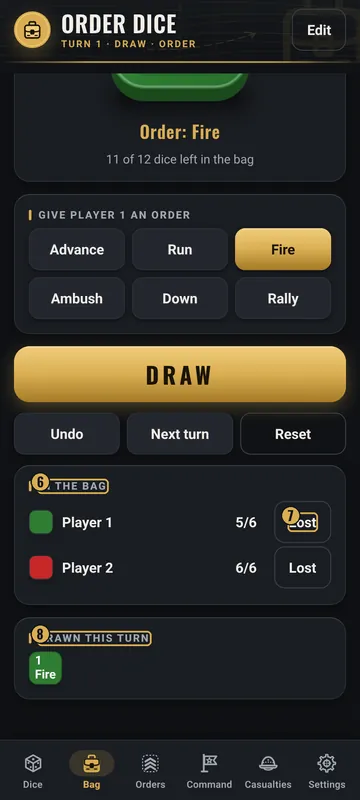
- In the bag
- Lost button
- Drawn this turn
Top
- Order Dice header
- Shows the turn number, like “Turn 1 · Draw · Order”.
- Edit
- Top right. Opens Players & dice, where you change names, colors and how many dice each player has.
Middle
- Big die
- Shows the last die drawn, in that player's color, with the player's name. Under it: “11 of 12 dice left in the bag”.
- Order buttons
- Advance, Run, Fire, Ambush, Down and Rally. Tap one to give the drawn die that order. Tap it again to clear it.
- DRAW
- The big gold button. It pulls one random die.
Bottom
- Undo
- Puts the last drawn die back in the bag.
- Next turn
- Fills the bag again and adds 1 to the turn.
- Reset
- Asks first, then fills the bag and goes back to turn 1.
- In the bag
- Each player with a color square and dice left, like 5/6. The Lost button takes one of that player's dice out for good.
- Drawn this turn
- Small colored squares, one for each die drawn, with its number and order.
Why it matters in the game
- Who acts first can win or lose a fight. A fair, random draw keeps it even.
- When a unit is lost, its die must leave the bag. Otherwise that player gets an extra turn.
- Tracking orders helps you remember what each unit did this turn.
What the words and numbers mean
- Order die
- One die for each unit. Each player's dice share one color.
- Bag
- Holds every die that has not been drawn yet this turn.
- Draw
- Pull one die out at random. Its color says which player acts.
- Order
- What the unit does: Advance, Run, Fire, Ambush, Down or Rally.
- Turn
- One full round where every die gets drawn once.
- Lost
- Takes one die away from a player for the rest of the game, like when a unit is wiped out.
- 5/6
- Dice left in the bag, out of that player's total.
Good to know: undo and saving
- Undo takes back the last draw, one at a time.
- Reset asks before it clears anything.
- In Edit you can have up to 8 players and up to 50 dice each. Changing dice or players refills the bag for this turn.
- The bag, the turn and the orders are saved on your phone. Close the app and come back, and it is the same.
- Want the draw big enough to read across the table? Turn on Big-number order dice view in Settings. It shows the color full-screen with Draw again and Close buttons.
- Order bag sort in Settings only changes the list order. Draws stay random.
All Skirmish Dice: WWII tab guides · Back to the Skirmish Dice: WWII page