Skirmish Dice: WWII › How each tab works › Orders
Tab 3 of 6 · Skirmish Dice: WWII
The Orders tab
What this tab is for
The Orders tab is a checklist of your units. You tap each one when it has its order, so you never lose track.
Tap a heading below to open or close it. The page remembers which ones you left open.
When you'd use this tab
Use the Orders tab when:
- At the start of the game, you add your units by name.
- Each time a unit acts, you tick it off.
- A unit gets pinned or loses models, and you want to keep count.
- Everyone has acted, and you end the turn.
Why use the app for this
Doing it by hand works, but the app makes it easier:
- No more tokens next to each model that get knocked over.
- A bar shows how many units are done, like “2 of 5”.
- Pins, losses live on one card for each unit.
- Vehicle damage sits right on the vehicle's card.
- End turn clears every tick in one tap.
How to use it, step by step
Try it: you have three units: Alpha, Bravo and a Mortar.
- Open the Orders tab. Scroll down to the box that says “Unit 1”.
- Type Alpha and tap Add. Do the same for Bravo and the Mortar.
- Alpha acts first. Tap Alpha's card. A green check shows up, and the top says “1 of 3”.
- Bravo gets shot at and takes a pin. Tap the + next to PINS on Bravo's card.
- When the last unit acts, the app asks “End turn 1?”. Tap End turn. Every check clears, and the turn becomes 2.
Where things are on the screen
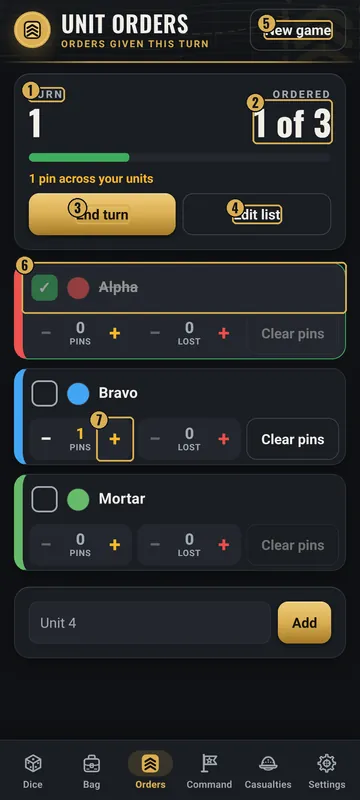
The numbers on the pictures match the list under each picture. Gold boxes show where each thing is.
- Turn number
- How many are done
- End turn
- Edit list
- New game
- Tap a card to mark it done
- Pins and losses counters
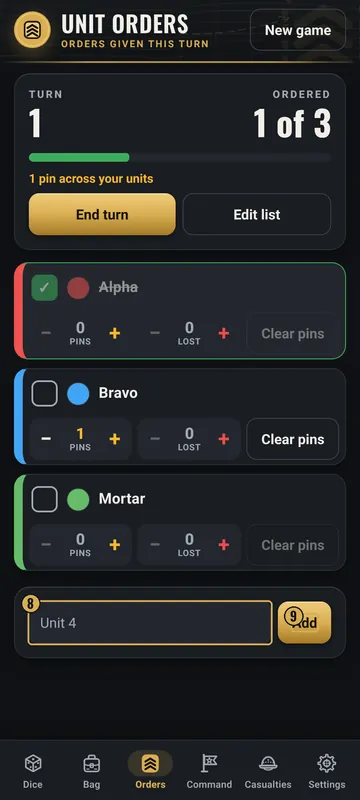
- Type a name
- Add
Top
- Unit Orders header
- The tab title.
- New game
- Top right. Starts a new game. It does a Quick reset unless you pick Full reset in Settings.
- Turn and Ordered
- Big numbers: the turn, and how many units are ordered, like “1 of 3”. A green bar fills up as you go.
- Pin count
- If any unit has pins, a line says how many pins in all.
- End turn
- Clears every check mark and adds 1 to the turn. Pins stay.
- Edit list
- Lets you rename, recolor, tag, move or remove cards. Tap Done when you finish.
Middle
- Unit cards
- One card per unit. Tap the top of a card to mark it ordered. It gets a green check and turns dim.
- Counters
- PINS and LOST, each with − and +. Clear pins sets pins to 0.
- Vehicle cards
- A vehicle card also has + Sup, + Full, Undo, Immobilized and Knocked out.
Bottom
- Add box
- Type a name and tap Add. If you leave it blank, it is called Unit 1, Unit 2 and so on.
- Edit mode extras
- In Edit list, each card gets colors, a short tag (up to 6 letters, like HQ), the type (Unit or Vehicle), ↑ and ↓ to move it, and Remove.
Why it matters in the game
- In most skirmish games each unit acts once per turn. Ticking them off stops a unit from acting twice, or being forgotten.
- Pins can make a unit worse at fighting. Tracking them keeps the rules fair.
- Losses on the card also show up on the Casualties tab, so the score is the same in both places.
What the words and numbers mean
- Unit
- One group of models on the table. Each unit gets its own card.
- Ordered
- This unit has had its order this turn. It shows a green check.
- Turn
- One round where every unit gets a chance to act.
- Pins
- Marks put on a unit that is under fire. They stay from turn to turn until you clear them.
- LOST
- How many models this unit has lost.
- Tag
- A short label of up to 6 letters, like HQ or A1.
- Vehicle
- A card type for tanks and other machines. It adds damage buttons.
- Superficial / Full
- Two kinds of vehicle damage. + Sup adds light damage. + Full adds heavy damage.
- Immobilized / Knocked out
- Switches for a vehicle that can't move, or is out of the fight.
Good to know: undo and saving
- Tap a card again to take the check mark away.
- On a vehicle, Undo takes back the last damage mark.
- Remove asks first. Removing a unit can't be undone.
- Everything here is saved on your phone, even if you close the app.
- Don't want the End turn question? Turn off Prompt to end turn in Settings.
- Unit card size in Settings makes the cards Compact, Normal or Large.
All Skirmish Dice: WWII tab guides · Back to the Skirmish Dice: WWII page