Cog & Clock: Battle Tracker › How each tab works › Dice
Tab 3 of 5 · Cog & Clock
The Dice tab
What this tab is for
The Dice tab rolls six-sided dice and works out your exact chance to hit and to do damage.
Tap a heading below to open or close it. The page remembers which ones you left open.
When you'd use this tab
Use the Dice tab when:
- Your model attacks and you roll 2d6 or 3d6.
- You want to drop the lowest die from an extra-die roll.
- You wonder if an attack is worth it before you make it.
Why use the app for this
Doing it by hand works, but the app makes it easier:
- One tap rolls and adds the dice, plus your stat.
- The lowest die is dropped for you and shown faded.
- Odds shows your exact chance, worked out from every possible roll. No guessing.
How to use it, step by step
Try it: you roll 3 dice, drop the lowest, and add 6.
- Open the Dice tab. Make sure Roll is picked at the top.
- Tap 3d6 drop 1. Dice shows 3 and Drop lowest shows 1.
- Set Add stat / power to +6 with the + button.
- Tap Roll. The dice show up. The faded one was dropped. The big number is your total.
- Want to know your odds? Tap Odds. It starts with 2 dice, Attack stat 6 and Target DEF 13. It reads “Hit 58.3%”. Change any number and the odds change right away.
Where things are on the screen
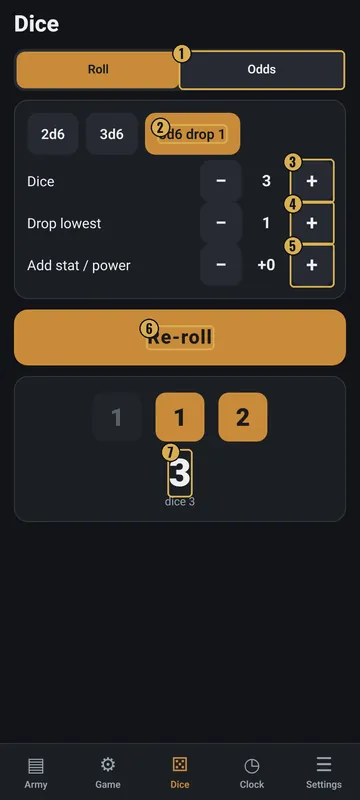
The numbers on the pictures match the list under each picture. Gold boxes show where each thing is.
- Roll / Odds
- Quick picks
- Dice
- Drop lowest
- Add stat / power
- Roll / Re-roll
- Total
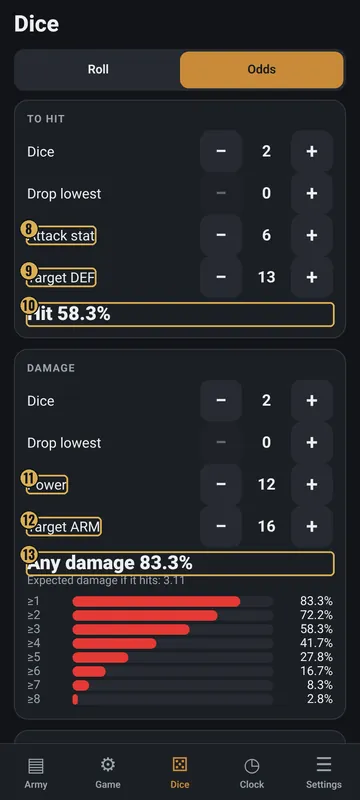
- To hit inputs
- Target DEF
- Chance to hit
- Damage inputs
- Target ARM
- Chance of any damage
Top
- Roll / Odds
- Two buttons. Roll rolls dice. Odds works out chances.
Middle: Roll
- Quick picks
- 2d6, 3d6 and 3d6 drop 1.
- Dice
- How many d6 to roll, from 1 to 6.
- Drop lowest
- How many low dice to throw away.
- Add stat / power
- A number added to the total.
- Roll / Re-roll
- The big gold button.
- Result
- Each die, the dropped ones faded, and the total. All 1s or All 6s shows up when it happens.
Middle: Odds
- To hit
- Dice, Drop lowest, Attack stat and Target DEF. The answer reads Hit and a percent.
- Damage
- Dice, Drop lowest, Power and Target ARM. Shows Any damage, expected damage and a bar for each amount.
- Bottom card
- Expected damage per attack, plus switches for All 1s always miss and All 6s always hit.
Why it matters in the game
- Knowing your odds helps you pick the best target.
- Fast, fair rolls keep the game moving.
What the words and numbers mean
- d6
- A die with 6 sides.
- 2d6 / 3d6
- Roll two or three d6 and add them.
- Drop lowest
- Throw away the smallest die before adding.
- Stat / power
- A number from the card that gets added to the dice.
- Hit
- Dice plus attack stat is equal to or more than the target's DEF.
- DEF
- Defence. How hard the target is to hit.
- ARM
- Armour. How much damage the target can block.
- Damage
- Dice plus power, minus ARM. It is never less than 0.
- Percent (%)
- The chance out of 100. 58% means about 58 times out of 100.
- Expected damage
- The average damage over many attacks.
- All 1s / All 6s
- With these switches on, all 1s always miss and all 6s always hit.
Good to know: undo and saving
- Rolls are not saved. Each new roll replaces the last one.
- The All 1s and All 6s switches are saved in your settings.
- Turn on Vibrate on taps and rolls in Settings to feel each roll.