Cog & Clock: Battle Tracker › How each tab works › Game
Tab 2 of 5 · Cog & Clock
The Game tab
What this tab is for
The Game tab runs the battle. It shows the score, the round and phase, and every model's damage and effects.
Tap a heading below to open or close it. The page remembers which ones you left open.
When you'd use this tab
Use the Game tab when:
- The game starts and you put your models on the table.
- A model gets hit and you mark damage.
- A turn ends and the next phase starts.
- Someone scores a point.
Why use the app for this
Doing it by hand works, but the app makes it easier:
- Each model gets its own damage boxes, so you don't need a pencil and paper card.
- The app counts down effects and refills leader points for you.
- A checklist shows what to do in each phase.
- Undo takes back a mistake, up to 40 steps.
How to use it, step by step
Try it: your mech gets hit for 3 damage.
- Open the Game tab. Tap + Add models and add your cards for each player.
- Tap the mech's row. Its sheet opens with its damage boxes.
- Tap + under the boxes until it says 3. If it is a grid, pick the column with ‹ and ›.
- Tap Apply 3 damage. Three boxes get an ✕.
- Made a mistake? Tap Undo at the top right.
- Tap Close. Back on the Game tab, tap Next phase › when the phase is done.
Where things are on the screen
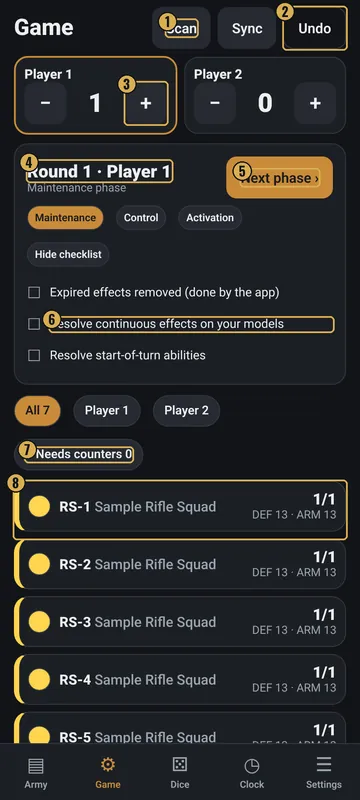
The numbers on the pictures match the list under each picture. Gold boxes show where each thing is.
- Scan and Sync (optional)
- Undo
- Score for each player
- Round, player and phase
- Next phase
- Phase checklist
- Filters
- Tap a model to open it
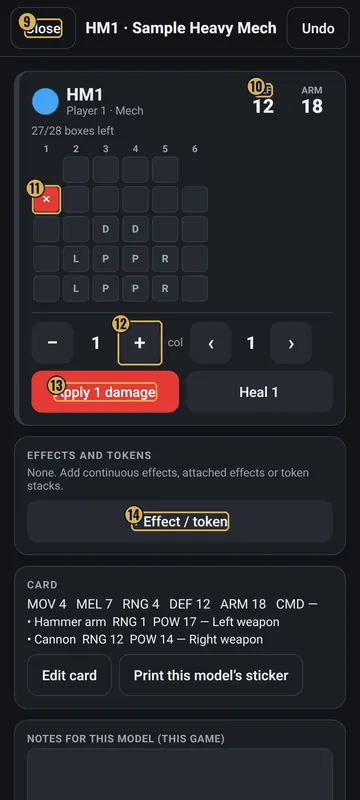
- Close
- Defence and armour
- Tap a box to mark damage
- How much damage
- Apply damage / Heal
- Effects and tokens
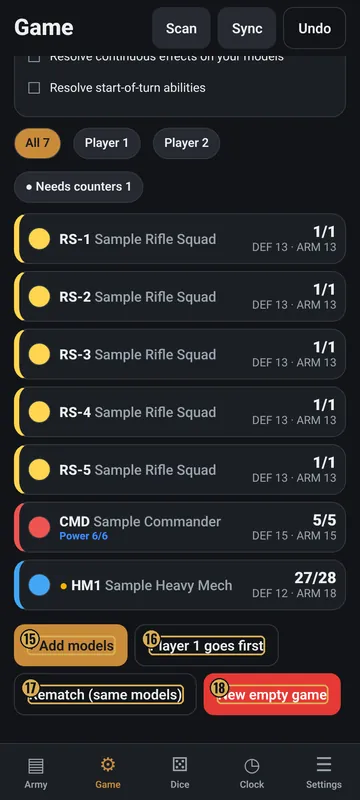
- + Add models
- Who goes first
- Rematch
- New empty game
Top
- Scan and Sync
- Show up only if you turn on QR stickers or Two-phone sync in Settings.
- Undo
- Takes back the last game change. It shows only when there is something to undo.
- Score boxes
- One for each player, with − and +. The player whose turn it is has a gold border. Long-press a name to rename it.
- Round card
- Shows “Round 1 · Player 1” and the phase. Next phase › moves on. The three phase chips show where you are.
Middle
- Checklist
- Tick boxes for the phase. Hide checklist hides them.
- Upkeep due
- In the Control phase, effects that need upkeep show Pay and Drop buttons.
- Filters
- All, Player 1, Player 2 and ● Needs counters.
- Model rows
- Each model's label, name, health (like 28/28), DEF and ARM, and any effects. Tap a row to open it.
Model sheet
- Damage boxes
- Tap a box to mark it. Long-press a marked box to heal it.
- Apply / Heal
- Set the amount with − and +, then tap Apply damage or Heal.
- Resource points
- For leaders: − and +, and Allocate 1 point to another model. Models with allocated points get Use 1 and Return 1.
- Effects and tokens
- + Effect / token adds one. Pick a name (or Burning, Slowed, Shielded, Stunned, Prone, Marked), a kind, an owner, how long it lasts and upkeep.
- Card and notes
- Shows the stats and weapons. Edit card, a notes box, Remove from play and Delete from game.
Bottom
- + Add models
- Opens a list of your cards with + Player 1 and + Player 2.
- Goes first
- Tap to switch who goes first.
- Rematch (same models)
- Same models, but damage, effects, scores and the clock reset.
- New empty game
- Removes every model from the game. Your cards stay.
Why it matters in the game
- Damage decides when a model is destroyed. Marking it right keeps the game fair.
- Effects that run out on time, and points that refill, are easy to forget by hand. The app does it.
- The score tells you when someone wins. A note shows up when a player reaches the points to win.
What the words and numbers mean
- Round
- Both players take one turn.
- Phase
- A part of a turn: Maintenance, then Control, then Activation.
- Maintenance
- Start of the turn. The app removes effects that ran out.
- Control
- The app refills or clears leader points. You pay upkeep and score.
- Activation
- Your models act. Then you pass the clock.
- Score
- Points from the scenario. The game shows a note when someone reaches the points to win (5 by default).
- Damage box
- One box is one point of damage. ✕ means marked.
- Destroyed
- Every box is marked. The model is out.
- Disabled
- Every box with that system letter is marked.
- Effect
- Something on a model, like Burning. You pick a kind: Continuous, Attached or Token. Tokens can stack, like ×3. An effect can last a set number of turns, or until you remove it.
- Upkeep
- A cost to keep an effect, paid in the Control phase.
- Allocate
- Give a leader's point to another model.
- Needs counters
- A model with damage, effects or allocated points.
- Removed from play
- Taken off the table but kept in the list.
Good to know: undo and saving
- Undo takes back up to 40 game changes, one at a time.
- The game is saved on your phone as you play.
- Rematch and New empty game ask first if Ask before deleting is on in Settings.
- With Two-phone sync on, Sync shares the game with a phone on the same Wi-Fi, or by QR codes.