Skirmish Dice: Strange Front › How each tab works › Command
Tab 4 of 6 · Skirmish Dice: Strange Front
The Command tab
What this tab is for
The Command tab counts your command points. You spend them with − and get them back with +. It also keeps Guts, Luck and Rift points for each side.
Tap a heading below to open or close it. The page remembers which ones you left open.
When you'd use this tab
Use the Command tab when:
- The game starts, and your rules give you some command points.
- You use a command point for a special move.
- Something in the game gives you a point back.
- You need side totals of Guts, Luck or Rift points.
Why use the app for this
Doing it by hand works, but the app makes it easier:
- No pile of tokens or pencil marks to rub out.
- The big number is easy to read from across the table.
- It turns red at 0, so you know you are out.
- One tap puts you back to your starting points.
How to use it, step by step
Try it: you start with 6 command points and spend 2.
- Open the Command tab. Under Game setup, check that Starting points is 6. Use − and + to change it.
- You use a point. Tap the big − Spend button. REMAINING shows 5.
- You use another. Tap − Spend again. Now it shows 4.
- Your rules give one back. Tap the gold + Gain button. Now it is 5.
- New turn and your rules refill points? Tap Reset to 6.
Where things are on the screen
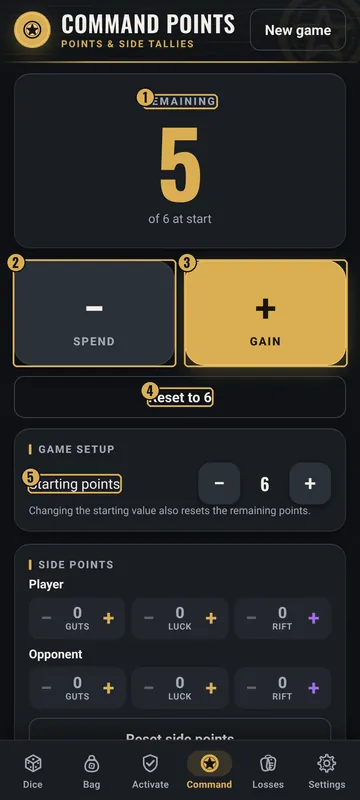
The numbers on the pictures match the list under each picture. Gold boxes show where each thing is.
- Points left
- Spend (−)
- Gain (+)
- Reset to start
- Starting points
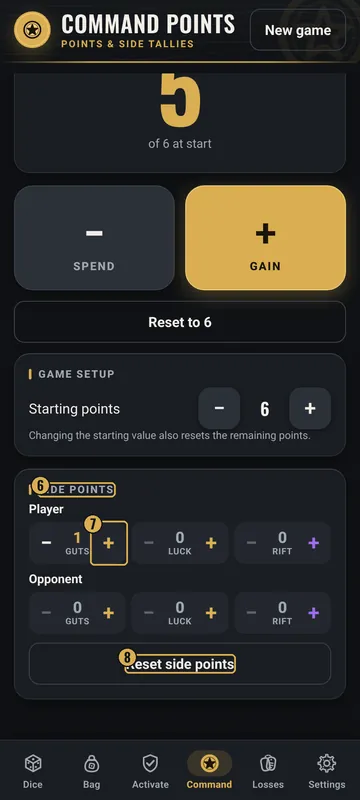
- Side points
- Guts, Luck and Rift
- Reset side points
Top
- Command Points header
- The tab title, with New game on the right.
- REMAINING
- The big number of points you have left, and “of 6 at start” under it. It turns red at 0.
Middle
- − Spend
- The big dark button. Takes away 1 point.
- + Gain
- The big gold button. Adds 1 point.
- Reset to 6
- Sets your points back to the starting number.
Bottom
- Game setup
- Starting points, with − and +. Changing it also resets the points left.
- Side points
- Guts, Luck and Rift counters for Player and for Opponent, each with − and +.
- Reset side points
- Sets all side points back to 0.
Why it matters in the game
- Command points let you do special things. Knowing how many you have helps you plan.
- If you spend a point you don't have, the game is not fair. The counter stops at 0.
What the words and numbers mean
- Command points
- Points you spend for special actions, if your rules use them.
- Starting points
- How many points you begin with. It starts at 6 and can go up to 999.
- REMAINING
- How many points you have right now.
- Spend / Gain
- Take away 1 point / add 1 point.
- Side points
- Guts, Luck and Rift points kept for the whole side, not one squad.
Good to know: undo and saving
- There is no undo button here. If you tap by mistake, tap the other button to fix it.
- Your points are saved on your phone.
- New game (top right) resets command points along with the rest of the game.
All Skirmish Dice: Strange Front tab guides · Back to the Skirmish Dice: Strange Front page