Skirmish Dice: Strange Front › How each tab works › Settings
Tab 6 of 6 · Skirmish Dice: Strange Front
The Settings tab
What this tab is for
The Settings tab lets you set up the app the way you like. You can change the look, the dice, the buzz and how new games start.
Tap a heading below to open or close it. The page remembers which ones you left open.
When you'd use this tab
Use the Settings tab when:
- The first time you use the app.
- The screen is too bright or too dark.
- The dice take too long to land.
- You want to start a fresh game.
Why use the app for this
Doing it by hand works, but the app makes it easier:
- You set things once and the app remembers them.
- Options you don't use stay hidden until you turn them on.
How to use it, step by step
Try it: make the app dark and the dice fast.
- Open the Settings tab.
- Under Display, tap Dark next to Theme.
- Under Dice, tap Fast under Dice animation.
- Scroll down to At the table. Make sure Keep screen awake is on, so the screen doesn't go dark mid-game.
- Scroll to Game. Tap Quick reset to clear the game but keep your squads.
Where things are on the screen
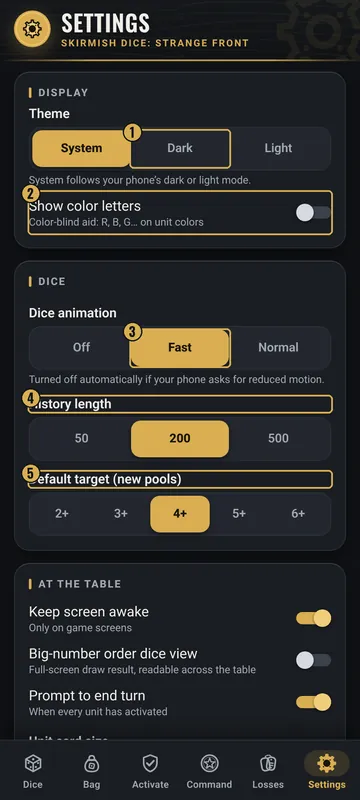
The numbers on the pictures match the list under each picture. Gold boxes show where each thing is.
- Theme
- Color letters
- Dice animation
- History length
- Default target
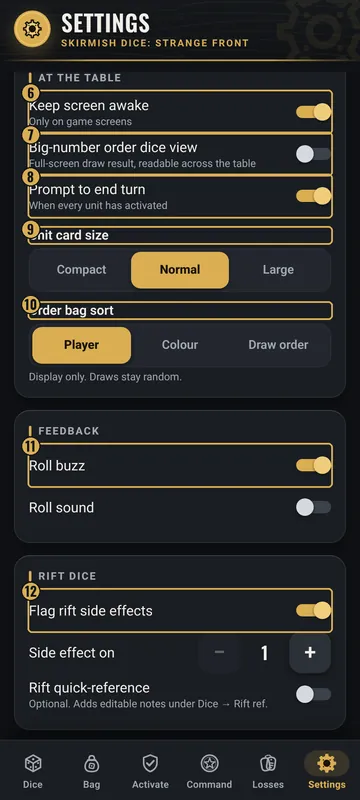
- Keep screen awake
- Big-number view
- Prompt to end turn
- Unit card size
- Order bag sort
- Buzz and sound
- Rift dice options
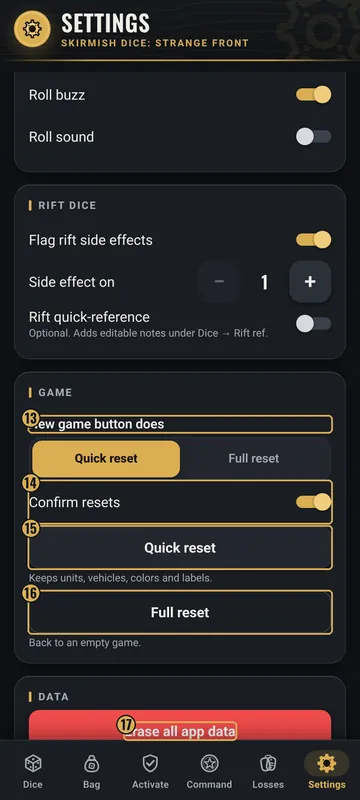
- New game button does
- Confirm resets
- Quick reset
- Full reset
- Erase all app data
Top: Display and Dice
- Theme
- System, Dark or Light. System follows your phone.
- Show color letters
- Adds R, B, G… on colors. It helps players who are color-blind.
- Dice animation
- Off, Fast or Normal. It turns off by itself if your phone asks for less motion.
- History length
- 50, 200 or 500 rolls kept.
- Default target (new pools)
- 2+, 3+, 4+, 5+ or 6+.
Middle: At the table and Feedback
- Keep screen awake
- Stops the screen from going dark on game screens.
- Big-number order dice view
- Shows each draw full-screen.
- Prompt to end turn
- Asks to end the turn when every squad is activated.
- Unit card size
- Compact, Normal or Large.
- Order bag sort
- Player, Colour or Draw order. Display only.
- Roll buzz / Roll sound
- A short buzz or a click when you roll.
- Rift dice
- Flag rift side effects, Side effect on, and Rift quick-reference.
Bottom: Game, Data and About
- New game button does
- Quick reset or Full reset.
- Confirm resets
- Ask before a reset.
- Quick reset
- Clears the game but keeps squads, vehicles, colors and labels.
- Full reset
- Back to an empty game.
- Erase all app data
- Deletes everything on this phone. It asks first.
- About
- The version, and a note that the app works offline with no ads.
Why it matters in the game
- A screen that stays on and dice that land fast keep the game moving.
- Color letters help every player read the colors.
What the words and numbers mean
- Theme
- The colors of the app: dark (charcoal and gold) or light (cream).
- Animation
- The dice tumbling before they land.
- Quick reset
- Clears the game but keeps your squads.
- Full reset
- Removes all squads and clears every tracker.
- Erase all app data
- Deletes history, presets, the bag, trackers and settings.
Good to know: undo and saving
- Settings save as soon as you change them.
- Full reset and Erase all app data can't be undone. With Confirm resets on, the app asks first.
- All your data stays on this phone. The app has no account and sends nothing anywhere.
All Skirmish Dice: Strange Front tab guides · Back to the Skirmish Dice: Strange Front page