Skirmish Dice: Strange Front › How each tab works › Losses
Tab 5 of 6 · Skirmish Dice: Strange Front
The Losses tab
What this tab is for
The Losses tab counts the models each side has lost. Its Vehicles view tracks damage on tanks and other machines.
Tap a heading below to open or close it. The page remembers which ones you left open.
When you'd use this tab
Use the Losses tab when:
- A model is taken off the table.
- You want to know who has lost more.
- A vehicle gets hit and takes damage.
- The game ends, and you compare totals.
Why use the app for this
Doing it by hand works, but the app makes it easier:
- No paper tally that gets lost or smudged.
- Big totals for both sides sit side by side.
- Losses you add on the Activate cards show up here too.
- Vehicle damage has big, color-coded buttons.
How to use it, step by step
Try it: your squad Alpha loses 2 models, and a tank is hit.
- Open the Losses tab. Make sure Squads and Player are picked.
- Type Alpha in the name box and tap Add.
- Tap +1 next to Alpha two times. PLAYER LOSSES now shows 2.
- Tap Vehicles at the top. Type Tank and tap Add.
- The tank takes light damage. Tap + Superficial. The tank now shows 1 sup.
- Tap Opponent to track the other side the same way.
Where things are on the screen
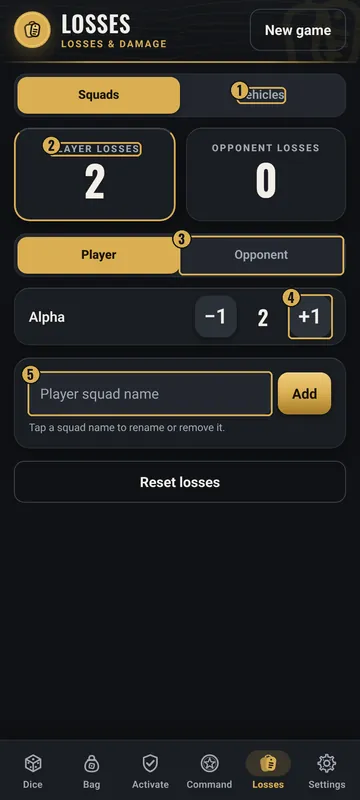
The numbers on the pictures match the list under each picture. Gold boxes show where each thing is.
- Squads / Vehicles
- Totals for each side
- Player / Opponent
- −1 and +1
- Add a name
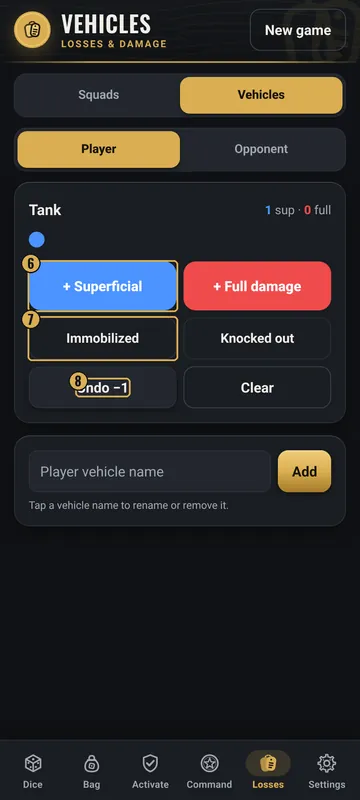
- Superficial and full damage
- Immobilized / Knocked out
- Undo −1 and Clear
Top
- Losses header
- The title, with New game on the right.
- Squads / Vehicles
- Switch between counting models and tracking vehicle damage.
Middle
- Totals
- Two boxes: PLAYER LOSSES and OPPONENT LOSSES. The side you are looking at has a gold border.
- Player / Opponent
- Pick whose list to see.
- List
- One row per squad, with −1, the count and +1. Tap a name to rename or remove it.
Bottom
- Add box
- Type a squad name and tap Add.
- Reset losses
- Asks first, then sets every count for both sides to 0. Names stay.
- Vehicles view
- Each vehicle has + Superficial (blue), + Full damage (red), Immobilized, Knocked out, Undo −1 and Clear.
Why it matters in the game
- Many games are won by the side that loses fewer models. A clear count settles it.
- Damaged vehicles may move or shoot worse. Tracking damage helps you follow the rules.
What the words and numbers mean
- Losses
- Models that have been taken out of the game.
- Player / Opponent
- Your side / the other side.
- Superficial damage
- Light damage on a vehicle. It shows as “sup”.
- Full damage
- Heavy damage on a vehicle.
- Immobilized
- The vehicle can't move.
- Knocked out
- The vehicle is out of the fight.
Good to know: undo and saving
- −1 takes back a loss you added by mistake.
- Undo −1 takes back the last vehicle damage. Clear wipes all damage on that vehicle.
- Removing a name or a vehicle asks first.
- All counts are saved on your phone.
All Skirmish Dice: Strange Front tab guides · Back to the Skirmish Dice: Strange Front page